Add a Person Gaming to Your Setup Photo
Add a person actively gaming to a fully set up gaming room scene with AI-generated photorealistic detail and natural lighting effects.
The Original Scene
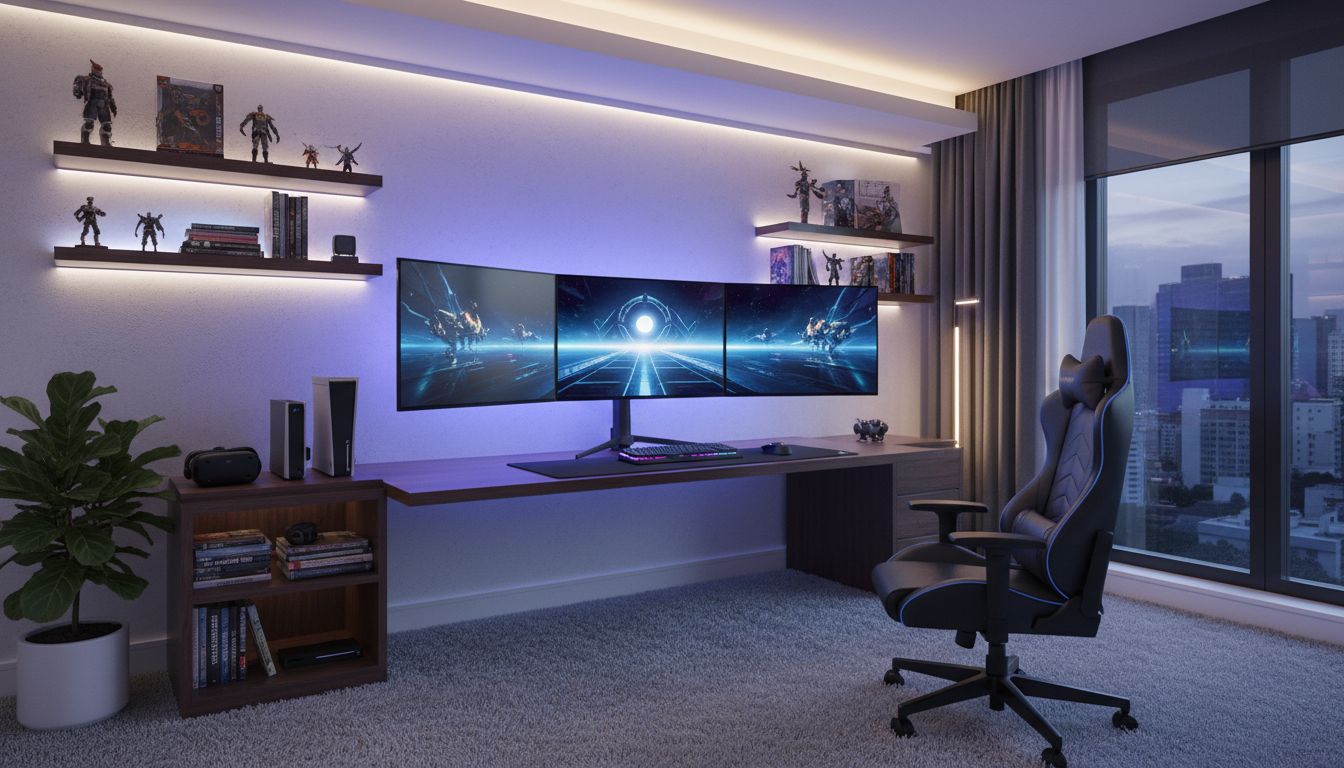
Gaming setups are a visual statement, and the best way to showcase one is with a gamer actually using it. This transformation takes an impressive bedroom gaming station -- a wall-mounted floating desk with dual curved monitors displaying a sci-fi game, LED strip lighting casting a purple glow behind the monitors and along shelving, a high-back racing-style gaming chair, a VR headset, a gaming console, and floating shelves displaying action figures and collectibles -- and adds a young man seated at the desk, hands on the RGB keyboard, fully immersed in gameplay.
The Custom Transformation
The original setup is aspirational on its own. The dual curved monitors show a vibrant sci-fi scene with neon blues and purples that complement the ambient LED lighting throughout the room. Floating wall shelves above and to the sides display carefully arranged action figures, game cases, and manga. A bookshelf unit beneath the desk holds additional games and books. The gaming chair sits angled toward the monitors, and a large window on the right reveals a dusky urban skyline, the blue twilight outside perfectly harmonizing with the room's purple-blue color scheme. Gray carpet and minimal clutter keep the focus on the tech.
Creative Applications
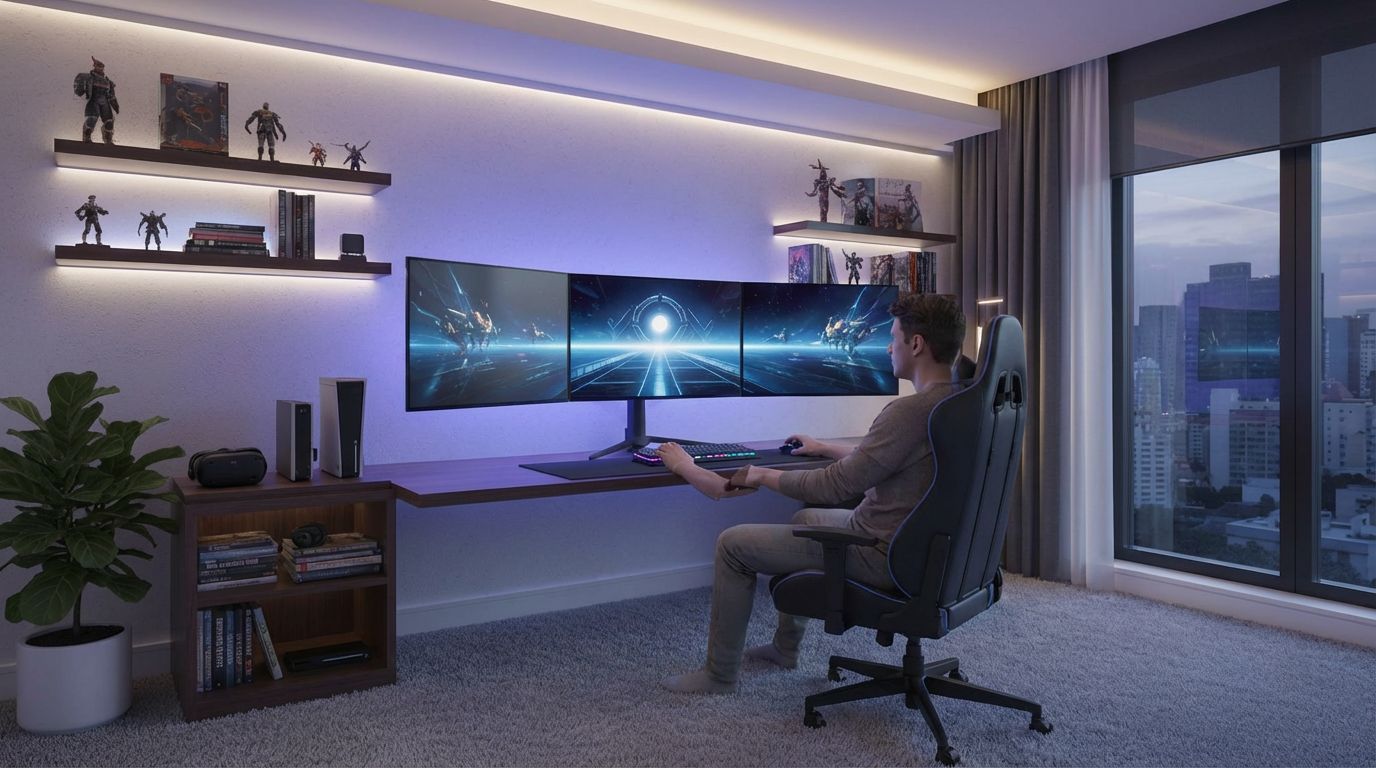
In the result, a young man sits in the gaming chair with his hands on the illuminated keyboard, leaning slightly forward in the focused posture of an engaged player. The monitors still display the same game, the LED lighting still bathes the room in purple, and every action figure on the shelves stays in place. The addition of the person transforms this from a product shot into a lifestyle image that content creators, gaming furniture brands, and setup showcase channels can use to demonstrate real-world use. It conveys the experience of the space, not just its aesthetics.
Inputs Used
Custom Prompt Used
"Add a person sitting at the desk playing a video game, hands on keyboard and mouse."
Ready to transform your room?
How to Recreate This
Place a gamer at a dual-monitor gaming station with LED lighting, showing the setup being actively used for an immersive gameplay session.
✨ What You'll Achieve
Original Room
After
Select Mode
Custom mode is the tool for adding people to tech setups. It handles the unique challenge of matching human figures to colored LED lighting and screen glow that characterize gaming rooms.
Upload Your Room
Upload your gaming setup photo showing the desk, monitors, chair, and ambient lighting. The empty chair and active screens help the AI understand where to position the figure.
Configure Options
Specify the gamer's posture (leaning forward intensely, relaxed), what they are wearing, and whether they are using a keyboard, controller, or VR headset. The AI will adapt the figure to your room's unique lighting conditions.
Generate
The AI generates a realistic gamer immersed in play, naturally seated in the racing chair with hands on the RGB keyboard, bathed in the same purple LED glow as the rest of the room. Every monitor, action figure, and lighting strip remains perfectly intact.
Your Result
🎯 Try the Result
Drag the slider to compare before and after!
Frequently Asked Questions
Can I add a gamer to my gaming setup photo?
Yes. Custom mode lets you place a person at any desk or workstation. In this example, a young man was added seated in the gaming chair with hands on the keyboard, naturally engaged with the dual-monitor setup. The AI matched his figure to the room's purple LED lighting for a realistic result.
Does the AI preserve LED lighting and screen content?
Yes. The ambient purple LED glow, the sci-fi game displayed on both curved monitors, the RGB keyboard lighting, and all decorative elements like action figures and game cases remain exactly as they appear in the original photo. The AI adds the person within this existing lighting environment.
What is this useful for beyond personal visualization?
Gaming lifestyle images are valuable for gaming furniture brands, monitor and peripheral marketing, YouTube or social media setup tours, gaming room design portfolios, and content creators who want to show their setup in use. Having a person in the scene adds the experiential dimension that product-only shots lack.
Custom AI Prompts
Explore landing.examples.ui.breadcrumbs.other Feature
Custom AI Prompts
Read the landing.examples.ui.breadcrumbs.other Tutorial
Related Examples
More landing.examples.ui.breadcrumbs.other Examples
Add Your Logo or House Number to Exterior Photos
Add People Collaborating to Your Office Photo
Add a Party Scene to Your Living Room Photo
Add a Person Reading in a Cozy Corner
Add a Person to Your Plant-Filled Sunroom