Virtually Remove Furniture to Show Empty Room
Digitally clear the room. Remove a dated dining set to reveal the architectural features, window placements, and open floor plan potential.
The Starting Point
Sometimes the goal is not to redesign or restyle, but simply to see what a room looks like completely empty. This example takes the deteriorating period dining room, with its peeling ceiling paint, faded wallpaper, arched bay window, and old furniture, and removes every piece of furniture to reveal the bare architectural shell. Real estate developers, renovation planners, and architects find this feature invaluable for understanding a room's raw potential.
The Redesign in Detail
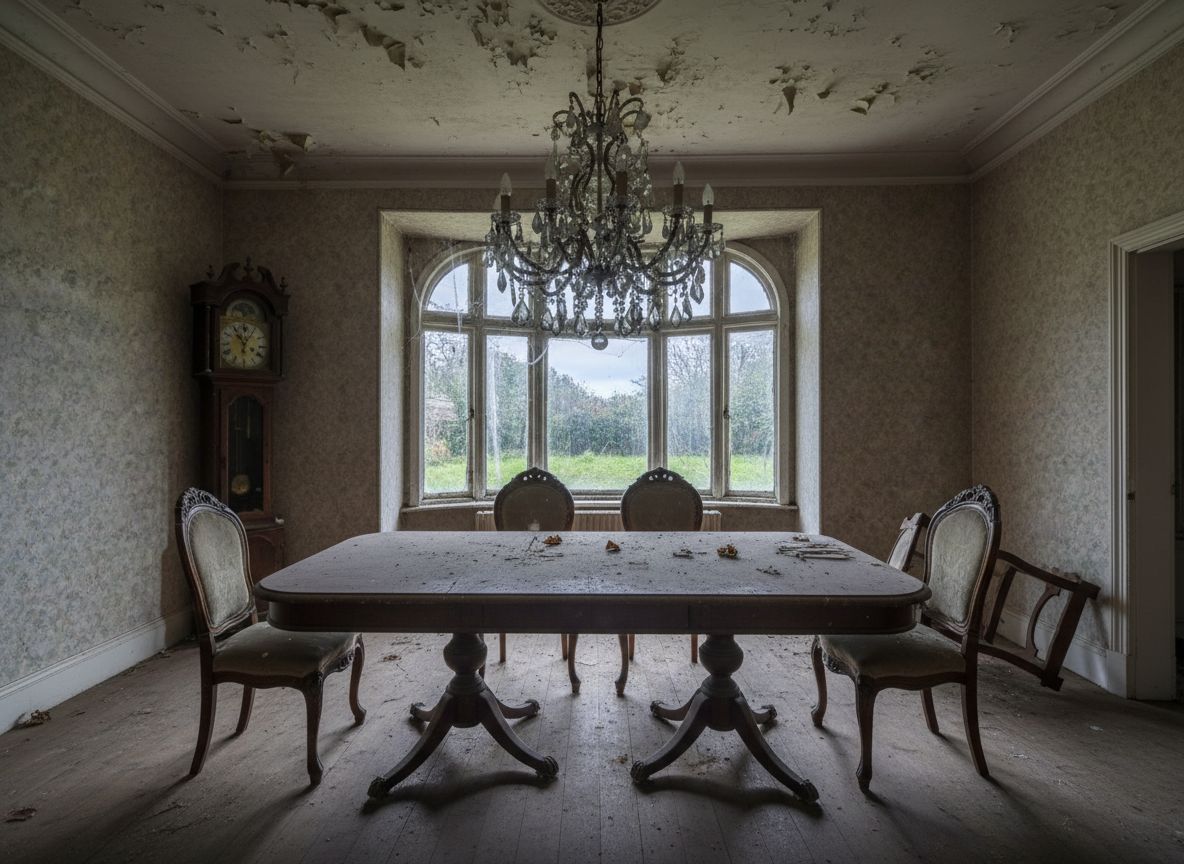
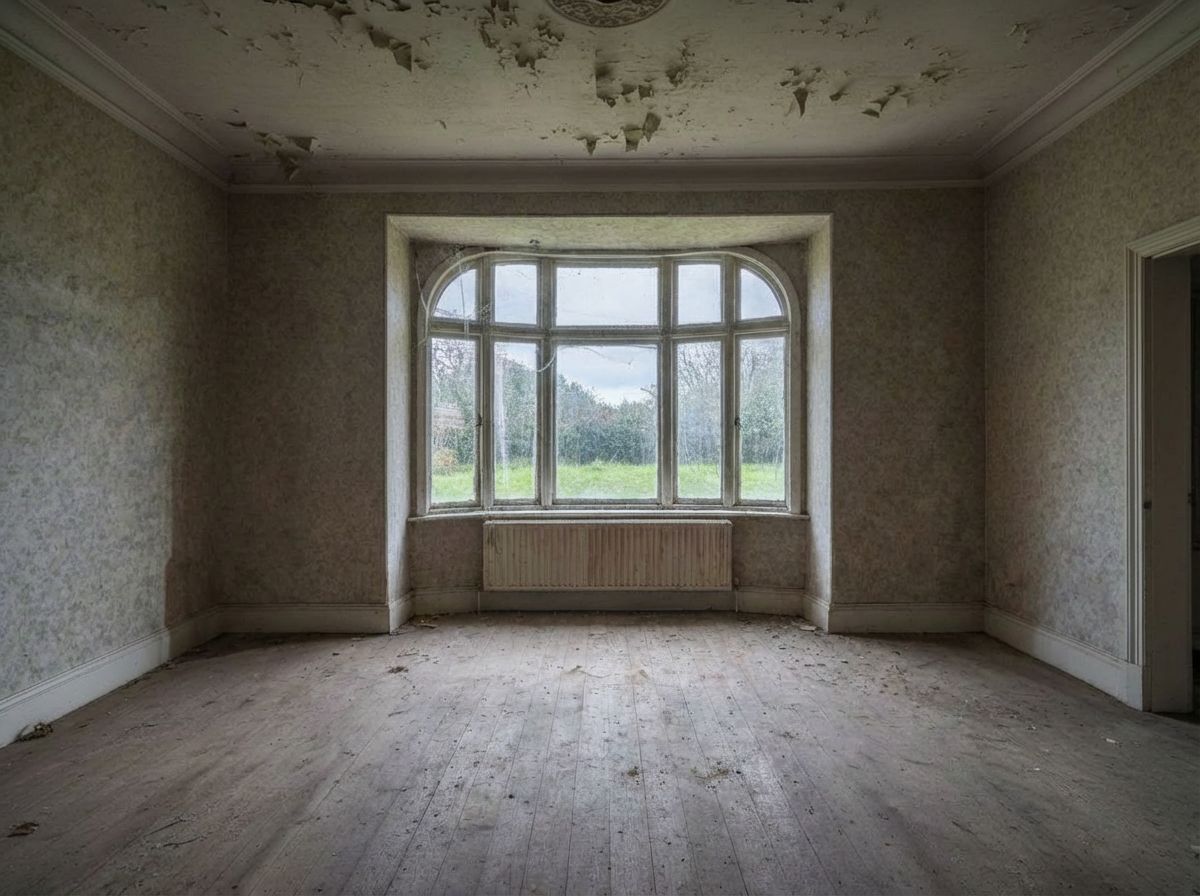
The original room contains a large Victorian dining table with ornate chairs, a grandfather clock, and a crystal chandelier. In the emptied version, all furniture is gone. The dining table, chairs, and grandfather clock have been cleanly removed, leaving only the room's bones visible. The wallpaper, peeling ceiling, and worn floorboards remain exactly as they are, because this is not about improving the room's condition but rather about seeing the space without furnishings.
Design Tips and Inspiration
The emptied result reveals details that were previously hidden: the full extent of the bare floorboards, the radiator beneath the bay window, the doorway to the right, and the ceiling medallion where the chandelier was mounted. The chandelier itself has been removed since it is a removable fixture rather than architecture. This kind of virtual emptying is particularly useful when planning a renovation, as it helps you visualize the space you are actually working with. Rather than mentally subtracting furniture while standing in a furnished room, RoomLab gives you a clear photograph of the empty shell to plan from.
Inputs Used
Ready to transform your room?
How to Recreate This
Strip a furnished period dining room down to its bare architectural shell to reveal the space's true dimensions and condition.
✨ What You'll Achieve
Original Room
After
Select Mode
Redesign mode's empty action is designed specifically for furniture removal. It strips out all movable items while preserving the room's architectural features, walls, floors, windows, and structural elements.
Upload Your Room
Upload a photo of the furnished room you want to see emptied. This example uses an old dining room with a large table, chairs, and grandfather clock, all of which will be removed to reveal the bare space.
Configure Options
No additional options are required for the empty action. The AI will identify and remove all movable furniture, decor, and non-structural fixtures while leaving the room's architecture intact.
Generate
The result shows the completely bare room with only architectural elements remaining: the peeling ceiling, faded wallpaper, worn floorboards, bay window, radiator, and doorway. All furniture and the chandelier have been removed.
Your Result
🎯 Try the Result
Drag the slider to compare before and after!
Frequently Asked Questions
Does the empty mode remove just furniture, or wall finishes and flooring too?
The empty mode removes only movable furniture, decor, and hanging fixtures. Architectural elements like walls, wallpaper, flooring, windows, radiators, ceiling details, and doorways remain untouched. In this example, the peeling ceiling and faded wallpaper are still visible in the empty version because they are part of the room's structure.
Why would someone want to see a room completely emptied?
Empty room visualization is valuable for renovation planning, real estate development, and architectural assessment. It reveals the true dimensions and condition of the space, shows hidden elements behind furniture, and provides a clean canvas for planning new layouts. Contractors and designers can assess the room's structure without furnishings obstructing the view.
Can I use the emptied room result as input for a different redesign style?
Yes. A common workflow is to first empty a room to see its architectural shell, then use that empty result as the input for a furnishing redesign in your preferred style. This two-step approach gives you maximum control over the transformation process.
Related Examples
More Redesign Examples
Add Bohemian Furniture to Your Dining Room
Transform Your Breakfast Nook to Modern Style
Stage an Empty Dining Room with Scandinavian Decor
Stage an Empty Dining Room with Scandinavian Decor
Clean Up Your Breakfast Nook for Better Photos