Turn Your Building Model into Marketing Visuals
Professional Architectural Visualization. Transform a commercial building model into a client-ready presentation image with ray-traced lighting and realistic street context.
The 3D Model
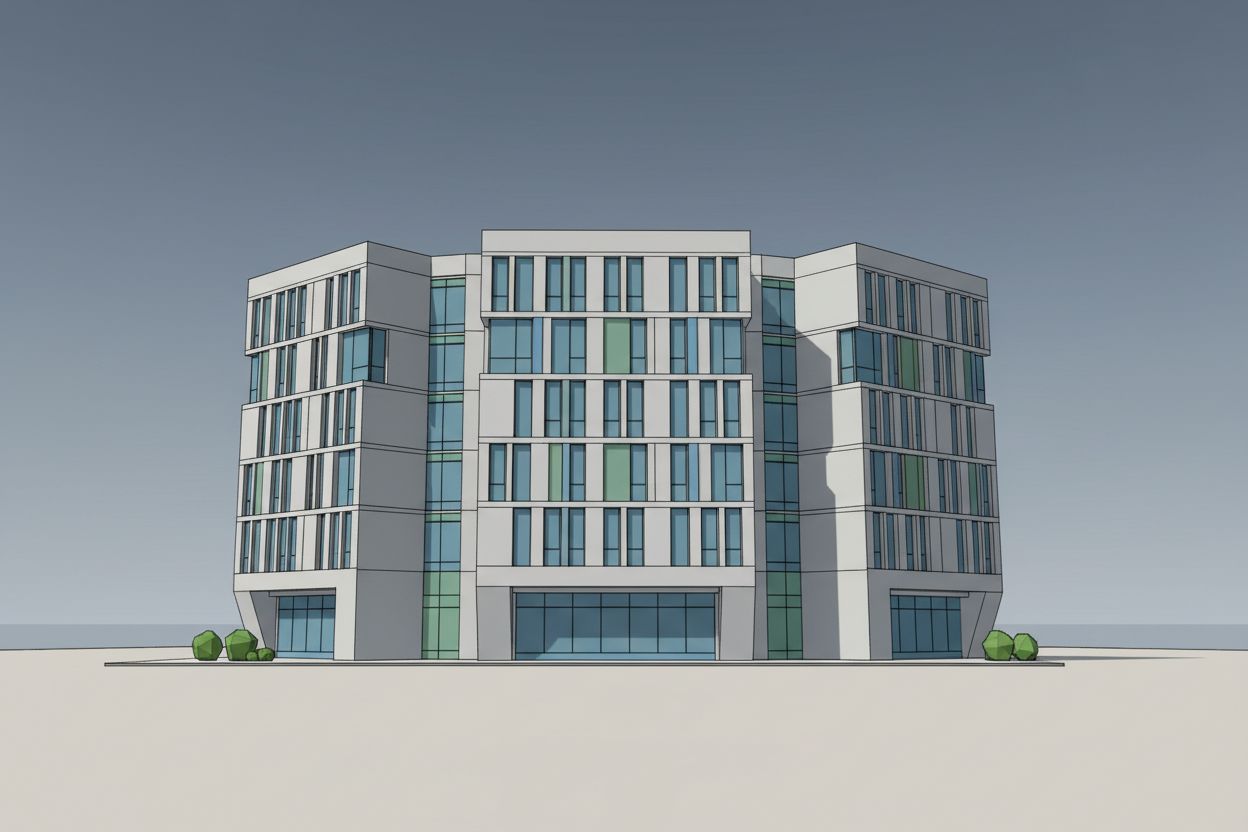
Commercial building renders require a different visual strategy than residential projects, and this SketchUp-to-photorealistic example demonstrates how RoomLab handles multi-story office buildings in an urban context. The original 3D model shows a contemporary six-story commercial building with a distinctive three-wing facade composition. The central section is slightly recessed with vertical mullions, while the flanking wings feature horizontal ribbon windows with blue-tinted glazing and some green accent panels. Small geometric shrubs are placed at ground level, and the building sits on a flat ground plane.
From Sketch to Photorealism
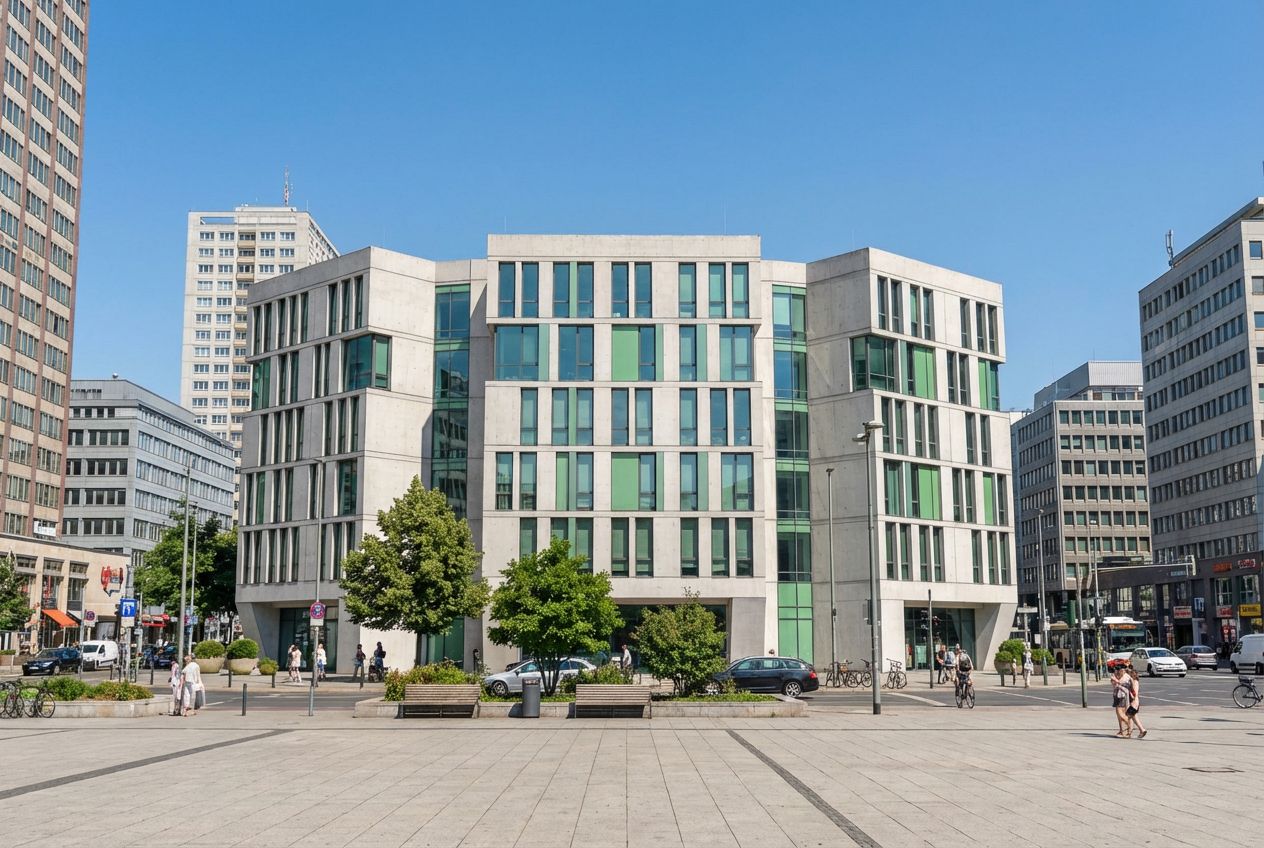
With midday lighting and an urban cityscape setting, the render places this building into a bustling city center. The formerly isolated model now stands among neighboring commercial buildings that establish the urban scale and context. A paved public plaza extends in front of the building with street furniture, mature trees, and pedestrians that bring the scene to life. Vehicles line the adjacent streets, and the surrounding buildings display the varied architectural character of a real downtown district. The midday sun produces even, bright illumination that clearly reveals the facade materials: exposed concrete panels, blue-green glass curtain wall, and the green accent panels that provide visual interest.
Tips for Better Renders
This type of contextualized commercial render is essential for development proposals, zoning applications, and investment presentations. Planning authorities and prospective tenants need to see how a proposed building will sit within the existing urban fabric, and isolated SketchUp models fail to communicate this relationship. The AI-generated urban context, complete with street life, adjacent buildings, and appropriate urban landscaping, transforms a conceptual massing model into a convincing development visualization. The midday lighting choice ensures maximum facade legibility, which is critical when the building's material palette and proportional system are the focus of the presentation.
Inputs Used
Render Settings Used
Ready to transform your room?
How to Recreate This
Convert a SketchUp model of a six-story commercial office building with a three-wing facade and curtain wall glazing into a photorealistic midday urban scene complete with surrounding cityscape and street life.
✨ What You'll Achieve
Original Room
After
Select Mode
Render mode transforms your commercial building model into a contextualized urban visualization. For this multi-story office building with its glass curtain wall and concrete facade, Render mode generates realistic materials and places the building within a complete urban environment.
Upload Your Room
Upload a screenshot of your SketchUp building showing the full six-story facade with the three-wing composition, blue-tinted glazing, green accent panels, and ground-floor entrance. A straight-on or slight three-quarter angle works best for commercial facades.
Configure Options
The AI will apply exposed concrete to the structural frame, blue-green glass to the curtain wall sections, and preserve the green accent panels. The urban context will include neighboring buildings, a public plaza with trees, street furniture, pedestrians, and vehicles.
Time of Day
Season
Landscape & Vegetation
Generate
The final render shows the office building standing confidently within a vibrant urban district, with bright midday sun revealing concrete and glass material detail, a pedestrian-filled public plaza in the foreground, and a varied cityscape of neighboring buildings providing realistic urban context.
Your Result
🎯 Try the Result
Drag the slider to compare before and after!
Frequently Asked Questions
How does the AI generate surrounding buildings for an urban cityscape context?
When you select the urban cityscape landscape option, the AI generates contextually appropriate neighboring buildings that match the scale and character of your proposed building. The surrounding architecture is varied and realistic, creating a believable urban fabric. The AI places your building as the focal point while generating a supporting urban context of commercial buildings, street furniture, and pedestrian activity.
Is midday lighting the best choice for commercial building renders?
Midday lighting is ideal when you want maximum clarity and facade legibility. The overhead sun evenly illuminates all facade surfaces, making it easy to assess material choices, window proportions, and the building's relationship to its context. For marketing materials where atmosphere matters more, golden hour or dusk may be more dramatic. For planning submissions and technical presentations, midday provides the most objective view.
Can the AI render a building taller than six stories accurately?
Yes. RoomLab's Render mode works with buildings of any scale, from single-story retail to high-rise towers. The AI interprets the building height and proportions from your SketchUp screenshot and generates appropriate materials, reflections, and environmental context. For very tall buildings, we recommend capturing the SketchUp model from a slightly elevated perspective to show the full facade.
3D to Photorealistic
Explore Render Feature
3D Exterior to Photorealistic
Read the Render Tutorial
Perfect For
Related Examples
More Render Examples
See This House in a Spring Neighborhood at Golden Hour
See This House in a Spring Garden in the Morning
See This House in a Fall Neighborhood at Night
See This House in a Fall Garden in the Morning
See This House in a Fall Neighborhood in the Morning