Add Realistic Surroundings to Your Cabin Render
Exterior visualization made easy. Render a 3D cabin model with environmental context—add realistic pine trees, snow, or sunset lighting to sell the atmosphere.
The 3D Model
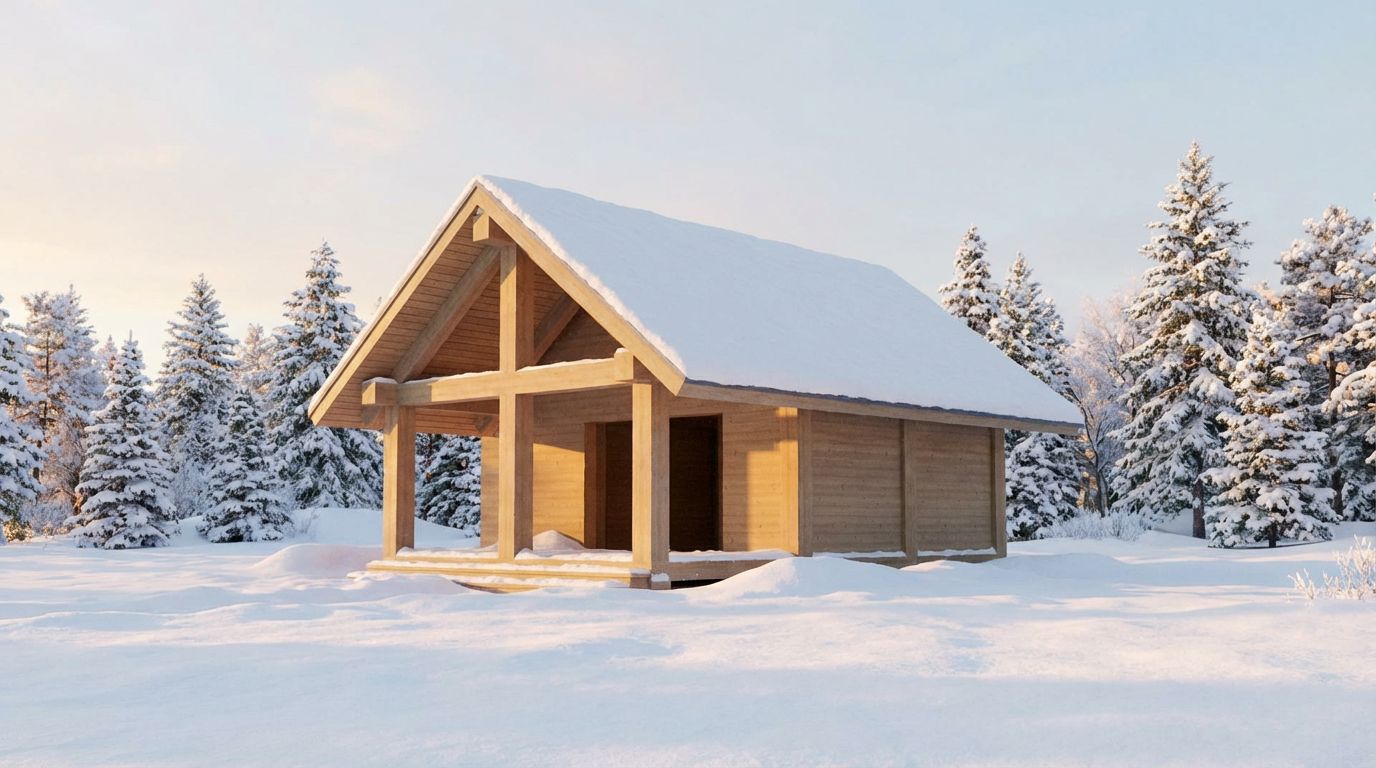
Timber-frame cabins present a unique rendering challenge because the warmth of natural wood must be balanced against environmental context, and this example shows how winter morning light enhances a rustic SketchUp model. The original 3D model depicts a single-story gable-roofed cabin with exposed timber post-and-beam construction. The front features an open porch with structural timber columns supporting the steep gable, while the side walls show horizontal timber cladding. The roof has a simple gray surface, and the entire structure sits on an empty SketchUp ground plane with no surrounding environment.
From Sketch to Photorealism
The winter morning render completely transforms the cabin's narrative. Deep snow blankets the roof ridge and accumulates in thick drifts around the foundation, while the timber structure retains its warm honey tones that contrast beautifully against the cold white landscape. Snow-laden evergreen trees, fir and spruce species, surround the cabin on all sides, creating a sheltered forest clearing. The morning sky carries a pale, cool tone with soft diffused light that gently illuminates the scene without harsh shadows. Snow texture varies naturally across the ground, from smooth undisturbed drifts to the slightly compressed area near the cabin entrance.
Tips for Better Renders
Winter renders are among the most emotionally evocative in architectural visualization. The contrast between warm timber and cold snow communicates shelter and comfort in a way that summer renders rarely achieve. For cabin designers, lodge developers, and vacation rental marketers, a winter morning render immediately communicates the cozy retreat experience that prospective buyers are seeking. The AI handles the complex interaction between snow accumulation, timber surfaces, and diffused winter light with impressive accuracy. The snow sits naturally on horizontal surfaces, clings to tree branches, and accumulates against vertical faces in a physically plausible manner that would require significant manual work to achieve in traditional rendering software.
Inputs Used

Render Settings Used
Ready to transform your room?
How to Recreate This
Transform a bare SketchUp timber-frame cabin model with exposed post-and-beam construction and a steep gable roof into a cozy winter morning scene surrounded by snow-laden evergreen forest.
✨ What You'll Achieve
Original Room
After
Select Mode
Render mode for exterior cabins adds environmental context including weather, vegetation, and seasonal atmosphere. For this timber cabin with its rustic structural detailing, Render mode will generate a complete winter wonderland setting with snow accumulation and forest surroundings.
Upload Your Room
Upload a screenshot of your SketchUp cabin model showing the front gable with exposed timber posts, the open porch area, horizontal timber cladding on the side walls, and the steep roof pitch. Capture the model at a slight angle to show both the front porch and side wall.
Configure Options
The AI will enhance the timber posts and cladding with realistic wood grain and warm honey tones, add snow accumulation to the roof and ground, generate surrounding evergreen trees with snow-laden branches, and create a pale winter morning sky.
Time of Day
Season
Landscape & Vegetation
Generate
The photorealistic result places the timber cabin in a serene winter clearing, with thick snow on the roof and ground, warm-toned wood structure standing out against the white landscape, and snow-covered evergreen forest surrounding the scene under soft morning light.
Your Result
🎯 Try the Result
Drag the slider to compare before and after!
Frequently Asked Questions
How does the AI generate realistic snow accumulation on the cabin roof and surroundings?
The AI analyzes the geometry of your SketchUp model and applies snow accumulation based on physical principles. Horizontal surfaces like the roof ridge and ground receive the heaviest coverage, while vertical surfaces like walls show minimal snow adhesion. Snow drifts form naturally against the building foundation and around vegetation. The result is a physically plausible winter scene generated entirely from AI interpretation of your 3D model and the selected season setting.
Will the timber texture look realistic on a model that uses simple wood-colored surfaces?
Yes. Even if your SketchUp model uses basic tan or wood-colored materials, the AI interprets these as timber surfaces and applies photorealistic wood grain, knot details, and natural color variation. The exposed post-and-beam structure in this example gains convincing timber character with visible grain lines and warm honey tones that contrast effectively against the winter snow.
Can I choose different tree types for the surrounding landscape?
The landscape type and season settings work together to determine vegetation. When winter is selected with a neighborhood landscape, the AI generates appropriate coniferous trees like fir and spruce that retain their foliage and hold snow on their branches. The trees are placed at natural intervals around the cabin to create a sheltered forest clearing that feels authentic to mountain and woodland cabin settings.
3D to Photorealistic
Explore Render Feature
3D Exterior to Photorealistic
Read the Render Tutorial
Perfect For
Related Examples
More Render Examples
See This House in a Winter Neighborhood in the Morning
Render Your SketchUp Office as a Real Photo
Render Your House Exterior Model Photorealistically
Convert Your 3D Bedroom Model to Photorealism
See This House in a Spring Neighborhood at Night