Remove Toys and Clutter from Kids Room Photos
Automatically remove scattered toys and clutter from a kids' bedroom while preserving the bed and layout, revealing the room's true size to buyers.
The Starting Point
If you thought the living room toy explosion was impressive, this kids' room takes clutter to another level. Two metal bunk beds face each other across a shared children's room, and between them, the floor has completely disappeared under a sea of toys. Train tracks, building blocks, dolls, stuffed animals, books, puzzle pieces, and board games cover every inch of space. Paper lanterns, string lights, children's drawings, and wall decorations add to the visual overload from above. It is the kind of room that makes parents sigh deeply.
The Redesign in Detail
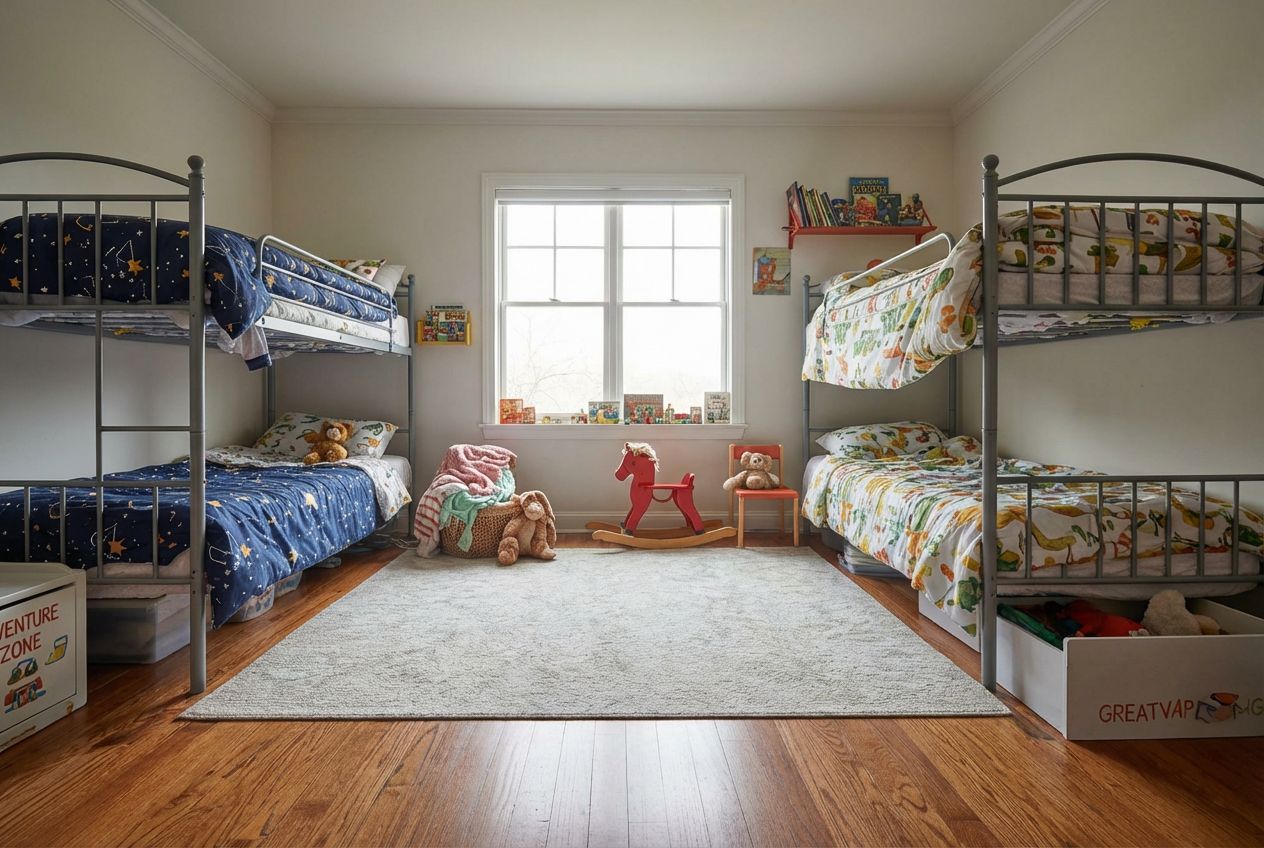
The decluttered version reveals a room that is not just clean but genuinely charming. The same two bunk beds remain in their positions with the same themed bedding, space-patterned on the left and animal-printed on the right. But now the hardwood floor is visible, covered by a soft grey area rug between the beds. A few select toys remain: a red rocking horse, some neatly placed stuffed animals, and books arranged on the window shelf. The wall has been simplified to a few pieces of artwork and a small book shelf, replacing the overwhelming collage of drawings and decorations.
Design Tips and Inspiration
The AI's intelligence in this transformation extends to knowing what to keep. Rather than stripping the room of all personality, it left child-appropriate touches: the rocking horse as a charming focal point, a few cuddly toys for comfort, and books within reach on the windowsill. The string lights and paper lanterns are gone, letting the natural light from the window take over. Labeled toy storage boxes peek out from under the beds, suggesting organization rather than absence. This is a clean kids' room, not a sterile one, and that distinction shows the AI's understanding of how family spaces should function.
Inputs Used

Ready to transform your room?
How to Recreate This
Transform a chaotic shared kids' room buried in toys into a clean, organized space that still feels fun and child-friendly.
✨ What You'll Achieve
Original Room
After
Select Mode
Redesign mode's clean action is ideal for children's rooms because it removes clutter intelligently, clearing the floor and reducing visual chaos while keeping enough toys and personality to maintain a warm, lived-in feel.
Upload Your Room
Upload a photo of the messy kids' room. Include the full floor area and beds in the shot. This example shows two bunk beds with the entire floor covered in toys, train tracks, and games.
Configure Options
No additional style options needed. The clean action focuses on decluttering while preserving the room's function as a children's space. Expect a tidy result that still looks like kids actually live there.
Generate
The result shows a beautifully organized kids' room: hardwood floors visible under a soft rug, both bunk beds neatly made, a few select toys including a rocking horse, and organized book storage, warm and inviting without the chaos.
Your Result
🎯 Try the Result
Drag the slider to compare before and after!
Frequently Asked Questions
Does the declutter AI remove all toys from a kids' room, or leave some?
The AI takes an intelligent approach. Rather than creating a sterile, empty room, it removes the floor clutter and excess while leaving a few select items that give the room personality: a rocking horse, some stuffed animals, and books on the shelf. The result looks like a well-organized children's room, not an abandoned one.
Can RoomLab handle rooms with two beds and complex layouts?
Yes. This example features two bunk beds facing each other in a shared children's room, and the AI handled the layout correctly. Both beds remain in their original positions with their individual themed bedding intact. The AI understands complex room arrangements and preserves the spatial relationship between multiple furniture pieces.
Is this feature useful for parents who want to motivate children to clean up?
Many parents use this exact approach. Showing children a cleaned-up version of their own room can be a powerful visual motivator. Rather than abstract instructions to tidy up, they see a concrete, realistic image of what their room could look like. The before-and-after comparison makes the goal tangible and achievable.
Related Examples
More Redesign Examples
Redesign Your Bedroom with Coastal Style
Give Your Bedroom a Modern Farmhouse Makeover
Declutter Your Home Office with One Click

Remove Clutter from Kitchen Photos Instantly
Stage an Empty Dining Room with Scandinavian Decor